Showing posts with label Kickstarter iPhone App. Show all posts

Sunday, June 30, 2013

Kickstarter iPhone App: Easy crash on the Messages inbox screen


Date: 06/30/2013

Kickstarter iPhone App: Version 1.2.2

Description:

There is a very easy way to crash the Kickstarter iPhone app.  It is not likely that any regular user will encounter this problem, but it is interesting nonetheless.

There is a “Messages” option on the iPhone app’s Profile section.

In the “Inbox” screen, if you coordinate (it takes a little finesse) pressing the magnifying glass and the back arrow, you will often be left stranded on an “Inbox” screen.

While on this screen the, you will be left stranded with the keyboard on screen, and no search box.  If you press “search”, or even if you just wait for a second or two, the iPhone app will crash.

If you receive automatic crash dumps, the majority of the ones you are seeing today are from me doing this.

This is easier to show than to describe, so please see the attached screenshots.

Steps to reproduce:

1.     While signed into a Kickstarter account, launch the iPhone app (version 1.2.2)
2.     Select the “Profile” option
3.     Select “Messages”
4.     (takes a little practice) Press and hold the magnifying glass and the back arrow
5.     Release fingers from magnifying glass and back arrow
6.     Quickly tap the magnifying glass and the back arrow again

Result:  Easy way to crash the Kickstarter iPhone app (version 1.2.2) by pressing and holding two options on the Messages screen, then releasing and then tapping them again

Expected:  No crash

From the "Profile" area of the app, select "Messages".....

Press and hold the arrow and the magnifying glass.  Then release, and tap both once....

You'll land here, after about two seconds, the app crashes, 100 percent.

Kickstarter iPhone App: Make Twitter, Facebook and More share icons disappear!


Date: 06/30/2013

Kickstarter iPhone App: Version 1.2.2

Description:

There is an incredibly minor bug with the twitter and facebook share buttons on project detail pages.

Writing it down because I am bored.

You should download the Kickstarter iPhone App, it is really good.

I’ve noticed a small bug.  If you head to any project detail page, you will find three share buttons.  A “tweet” button, a facebook share button, and a “More” button.

If you coordinate pressing either the “tweet” or facebook share buttons while pressing the more button simultaneously, all three buttons will disappear if you cancel out of sharing either the facebook posting or tweet.

The buttons only disappear momentarily, and then you’re suddenly bumped back to the top of the screen.

An extremely minor bug, but one I found to be interesting.  Please see the attached screenshots.

Steps to reproduce:

1.     Launch the Kickstarter iPhone app (version 1.2.2)
2.     Sign in with your account
3.     Head to any project’s detail page
4.     Use two fingers and press the Twitter share icon the “more” icon at the same time
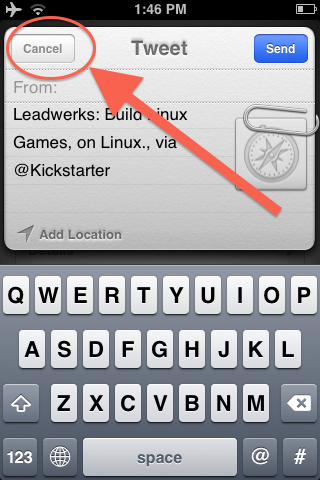
5.     Cancel out of the draft tweet
6.     Watch as the twitter, facebook and more icons disappear from the app
7.     Watch as your bumped to the top of the screen
8.     Scroll down and watch the icons return

Result:  On an project detail page, pressing either the “twitter” or facebook share icons while pressing the “More” icon at the same time results in the three icons momentarily disappearing from screen – and you’ll get bumped back to the top of the project

Expected:  Pressing either the twitter icon or the facebook share icons while also pressing the “more” icon shouldn’t result in buttons disappearing from within the Kickstarter iphone app

Impact:  LOOOOOOWWWWW

Coordinate pressing the Tweet share icon and the More icon at the same time....

Cancel out of the tweet....

The tweet, facebook share, and more icons momentarily disappear.